Overview
The core of Adobe Connect 12 contains an upgrade of the underlying audio/video/screensharing technology from RTMP to WebRTC.
WebRTC was designed from the outset to work across a wide range of networks, so for most
customers, it will “just work.” However, some customers with restrictive firewalls or web
proxies may need to update their network configurations.
Any issues are likely to manifest themselves after the meeting has been launched when a user
tries to publish or view audio, video, or screen sharing.
In this whitepaper, we will describe the minimum required network configuration and the
recommended network configuration for optimal performance.
Note: These configurations are in addition to any existing network configuration
customers may have implemented for Adobe Connect – the current configurations
should be retained, as Connect 12 still uses RTMP for signaling.
Minimum required network configuration
The minimum configurations are divided as:
- Configuration for web traffic
- Configuration for WebRTC traffic
MINIMUM CONFIGURATION FOR WEB TRAFFIC
Users must allow standard https:// and wss:// web traffic to *.cosocloud.com
Very few customers will need to change anything to meet this requirement, as this is standard
HTTPS traffic.
MINIMUM CONFIGURATION FOR WEBRTC TRAFFIC
When all other communication methods are blocked, WebRTC falls back to tunneling over
TLS (TURN-S). This is similar to how RTMP falls back to tunneling over HTTPS.
TURN-S performs very well. Approximately twenty percent of our production WebRTC traffic
occurs over TURN-S, and those users have a great experience.
However, some proxies and firewalls block TURN-S traffic, because on deep inspection it isn’t
the same as HTTPS traffic. This is especially true for customers with firewall or proxy devices
that perform man-in-the-middle inspections.
The minimum requirement is:
- Allow TURN-S traffic (or simply all encrypted traffic) over port 443 to
*.admin.cosocloud.com
Recommended network configuration
One of the biggest advantages of WebRTC is that it prefers UDP traffic. UDP handles poor
network conditions (high latency, high packet loss) better than TCP.
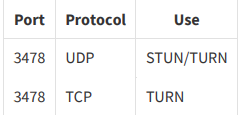
Accordingly, we recommend that customers allow the following UDP and TCP ports:
Testing the network configuration
For testing the network configuration post changes requested above please do the following
- Enable ‘Enhanced Audio/Video Experience’ for one of the existing rooms or a new
room - Join the room as a host and start sharing your camera in the room
- Join the same room again (either from the same device or from a different device)
- If the shared camera is visible in the room from the second device then the changed
network configuration is working as expected