
Sometimes users in an Adobe Connect meeting session will have issues with lag or connection. The user will drop out, come back in, and/or have problems staying connected to the session.
There are a number of potential reasons for lag connection issues. For example:
- Security/firewall software on the user’s computer may be blocking ports or protocols that would force them to tunnel (which can cause excessive lag and reconnects).
- A firewall or proxy on the user network may be blocking ports or protocols which would force the user to tunnel (which can cause excessive lag and reconnects).
- If on a home network, settings on a router may be blocking ports or protocols which would force her to tunnel (which can cause excessive lag and reconnects).
- If on a home network, a possible issue at the ISP level.
- A possible issue with an upstream provider outside of the user’s home or corporate network but along the path to the Adobe Connect servers.
A good way to test during the meeting is to ask the user to click on the connection icon in the top right corner of the meeting. You’ll see a connection status that gives some basic info: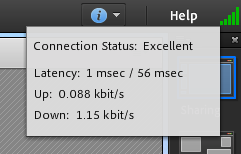
If you see high latency (greater than 2 seconds and the icon showing as orange/red), then chances are that would be part of the issue. the user would want to investigate their network as best as they are able.
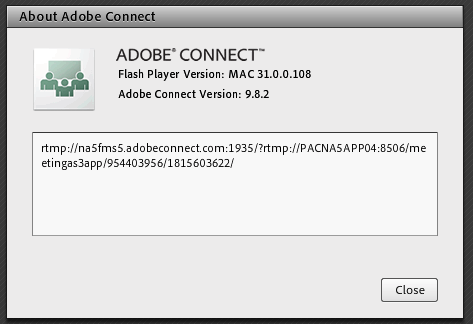
As well, if you click on Help and then hold down the right shift key and click About Adobe Connect… you can see how the user is connecting and if they’re tunneling:
If the connection string begins with rtmpt, then the user is tunneling due to a blocked port/protocol and will see issues with lag and disconnects.
In some cases, you’ll see the user drop from the Attendee list, then come back listed as Use Name 2. This indicates that the disconnect happened between the user’s local computer and the Adobe Connect servers. In cases such as this, it would be ideal for the user to reach out to their network team to ensure the following:
- RMTP/S traffic is allowed on their network
- The following ports/protocols are opened to traffic: port 1935, RTMP, or RTMPSS on port 443.
- The Adobe Connect environment (URL) is whitelisted on any proxies that are on the network.
If nothing pertaining to Adobe Connect is being blocked, then it is recommended that you reach out to Adobe or your Adobe Connect provider and ask them to look into the issue.