
Here are some details on how reusing meetings works in the LTI and why certain meetings may not appear in the search results.
The main rule is that you must be listed as a Meeting Host in the participant list of any Meeting you’re searching for.
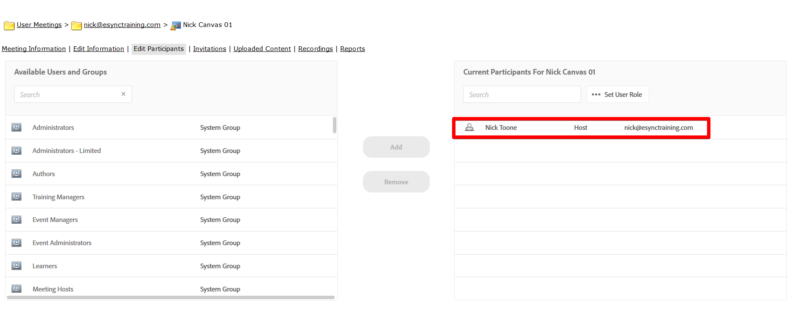
Here is one of my test Canvas Rooms where I’m listed as the Host:
When I search for my name in the LTI, I can see this meeting (as well as others):

So I can now select Nick Canvas 01 and add it to the course.
However, since I’m not listed in this Canvas Course:
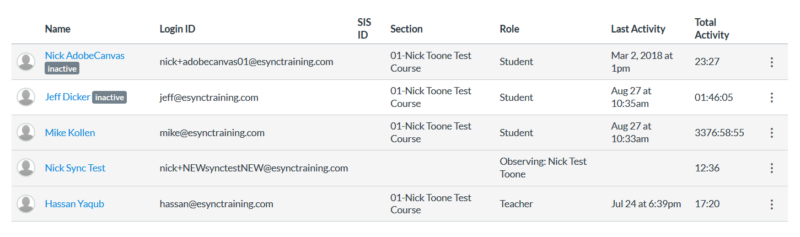
When the LTI Sync runs, it will remove me from the Participant list both in the LTI:
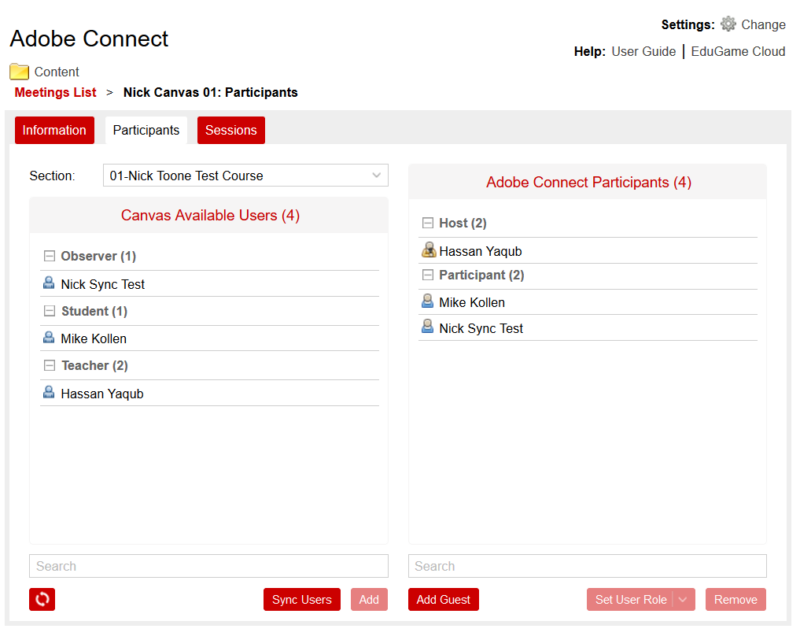
And in Adobe Connect:

Now I am no longer listed as a Host in the meeting, I can no longer search for that meeting:

If you’re finding that you cannot find the meeting you’re looking to add, log in to Adobe Connect and check the meeting’s Participant List. You can add yourself as a Host, but keep in mind that if you’re not in the course when the LTI sync runs, this will update you in the Participant List in the Connect meeting.
Note: If you’re in the Canvas Course People list as a role other than Teacher, your role will update to reflect that when the sync happens. For example, if you’re in the Course as a Student, the sync will change your role in the meeting from Host to Participant. This means that you will not see the meeting when you search for it in the LTI.